Weekly chatbot transcript review: turning unanswered questions into content gaps


TL;DR
Find repeated and unanswered questions
Group similar questions by intent
Identify the real content gap
Update one source or response rule
Test the same question again
The goal is simple: use Matram’s conversation history to make your support content better every week.
Introduction
Matram is trained on your website, help centre, and uploaded documents. It answers from that content, shows the source behind the answer, and hands the conversation to a person when needed.
But the most useful information often appears after the answer.
A visitor may ask the same question several times. They may correct the chatbot. They may leave after receiving a vague answer. They may ask for a human because the available content does not cover their situation.
That is where chatbot transcript analysis becomes valuable.
This guide is published by the team behind Matram, but the workflow works with any chatbot that stores conversation history.
What Matram’s chatbot transcript analysis should find
Do not begin by reading every conversation from beginning to end. Start with the conversations that reveal friction.
| Signal in Matram | What it may mean | What to check |
|---|---|---|
| The same question appears repeatedly | The answer is missing or difficult to find | Add or improve the relevant page |
| The visitor corrects the chatbot | Your source may be outdated | Check the source against the current policy |
| The chatbot cannot answer | No approved source covers the question | Create a source or define a handoff |
| The conversation is escalated | The question needs a person or clearer process | Review the reason for escalation |
| The visitor asks again | The first answer was incomplete | Rewrite it more directly |
| The visitor leaves quickly | The answer may be unclear or too long | Review the opening response |
A chatbot failure describes what happened. A content gap explains why it happened and what should change.
That is the real purpose of chatbot transcript analysis in Matram.
Matram’s 30-minute chatbot transcript analysis loop
You do not need a large research project. A short weekly review is enough.
1. Pull the right Matram conversations
Start with a small sample from the previous week.
Prioritise:
- Repeated questions
- Escalated conversations
- Questions with no clear answer
- Conversations where the visitor asked for clarification
- Chats that ended immediately
- Answers without a useful source
Do not review only successful conversations. The difficult ones show where Matram needs better content or a clearer boundary.
2. Group similar questions
Visitors rarely use the exact same wording.
For example:
- “Can I cancel my plan?”
- “How do I stop billing?”
- “What happens if I end my subscription?”
These may all represent one intent: cancellation policy.
Matram’s Top questions view helps you identify repeated questions, how often they were asked, and whether they received an answer. See Matram’s features.
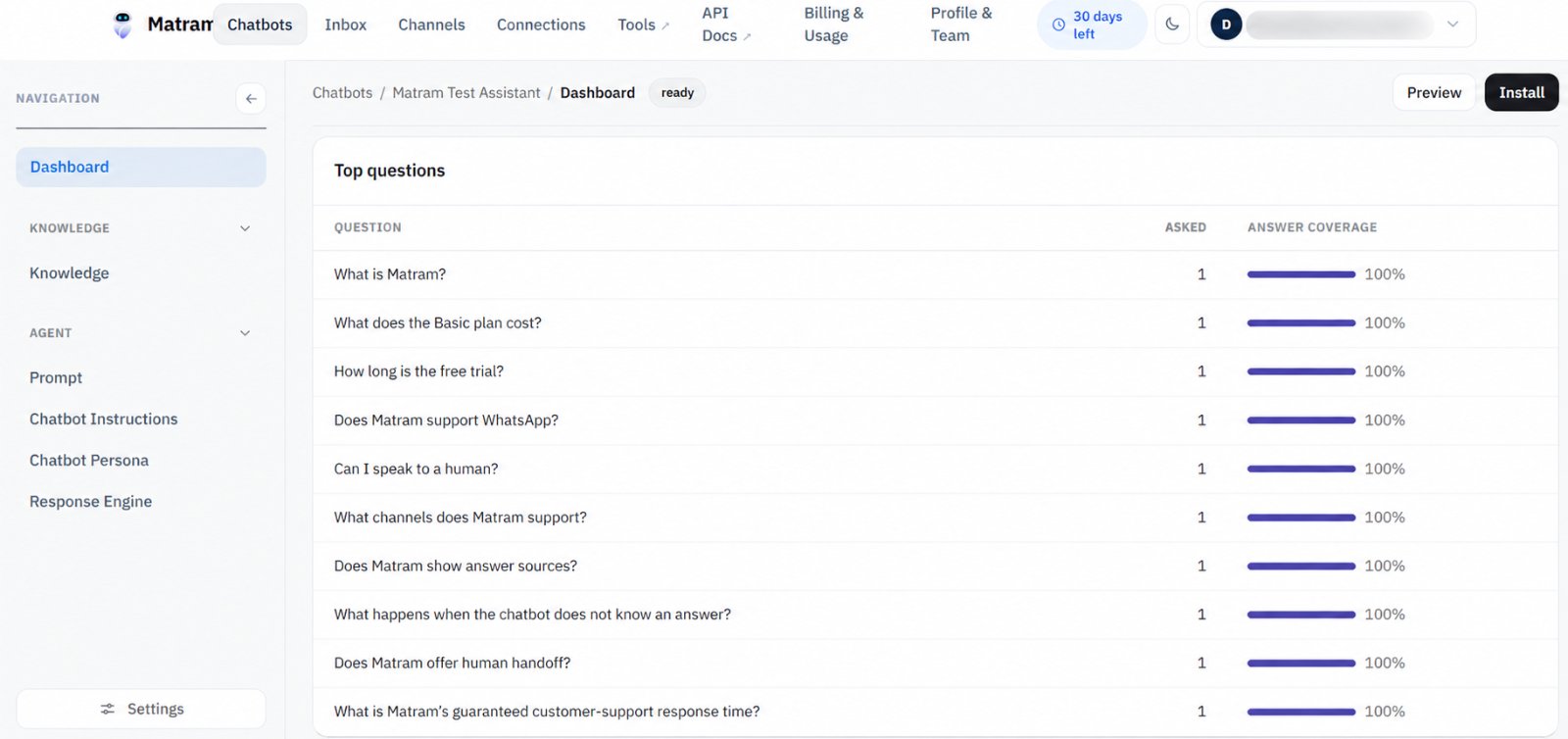
Caption: Matram’s test dashboard showing repeated questions and answer coverage.
3. Diagnose the content gap
Every repeated or unanswered question usually belongs to one of six categories:
- Missing: the answer does not exist in your content
- Stale: the information has changed
- Buried: the answer exists but is difficult to find
- Unclear: the wording allows different interpretations
- Restricted: the chatbot should not answer without a person
- Out of scope: the chatbot is being asked to perform an action it cannot complete
This step matters because each category needs a different fix.
Adding another paragraph will not solve a restricted question. Updating a source will not solve a handoff problem. A longer answer will not fix unclear product language.
Good chatbot transcript analysis identifies the type of problem before suggesting a solution.
4. Make one Matram content change
Fix the smallest useful thing first.
That may mean:
- Adding one sentence to an existing help article
- Creating a short FAQ
- Updating an outdated price or policy
- Adding a link to a buried answer
- Clarifying what Matram can and cannot do
- Creating a human-handoff rule for sensitive requests
Avoid rewriting your entire knowledge base after one difficult conversation. Make one change that can be tested.
5. Ask the same question again
After updating the source, test the original question again.
Then test one natural variation.
Check whether:
- The answer is direct
- The source link is relevant
- Matram avoids inventing details
- The visitor knows what to do next
- The question still needs a human
This closes the loop. Without a second test, chatbot transcript analysis becomes a list of observations instead of an improvement process.
How Matram supports chatbot transcript analysis
Matram’s dashboard brings several review signals into one place:
- Conversations
- Answer coverage
- Leads captured
- Escalations
- Top questions
Use these numbers as review signals, not automatic proof of performance. A test workspace showing 100% answer coverage after five conversations is not a benchmark. It only describes that test sample.
Open Matram’s conversation history to read the actual exchange. The transcript shows:
- What the visitor asked
- What Matram answered
- Whether the answer addressed the real intent
- Whether a source was available
- Whether the conversation was escalated
Matram is designed to answer from approved content and show the source used. Its strict behaviour is useful when your priority is avoiding confident guesses. You can also review how Matram handles workspace content through its security practices.
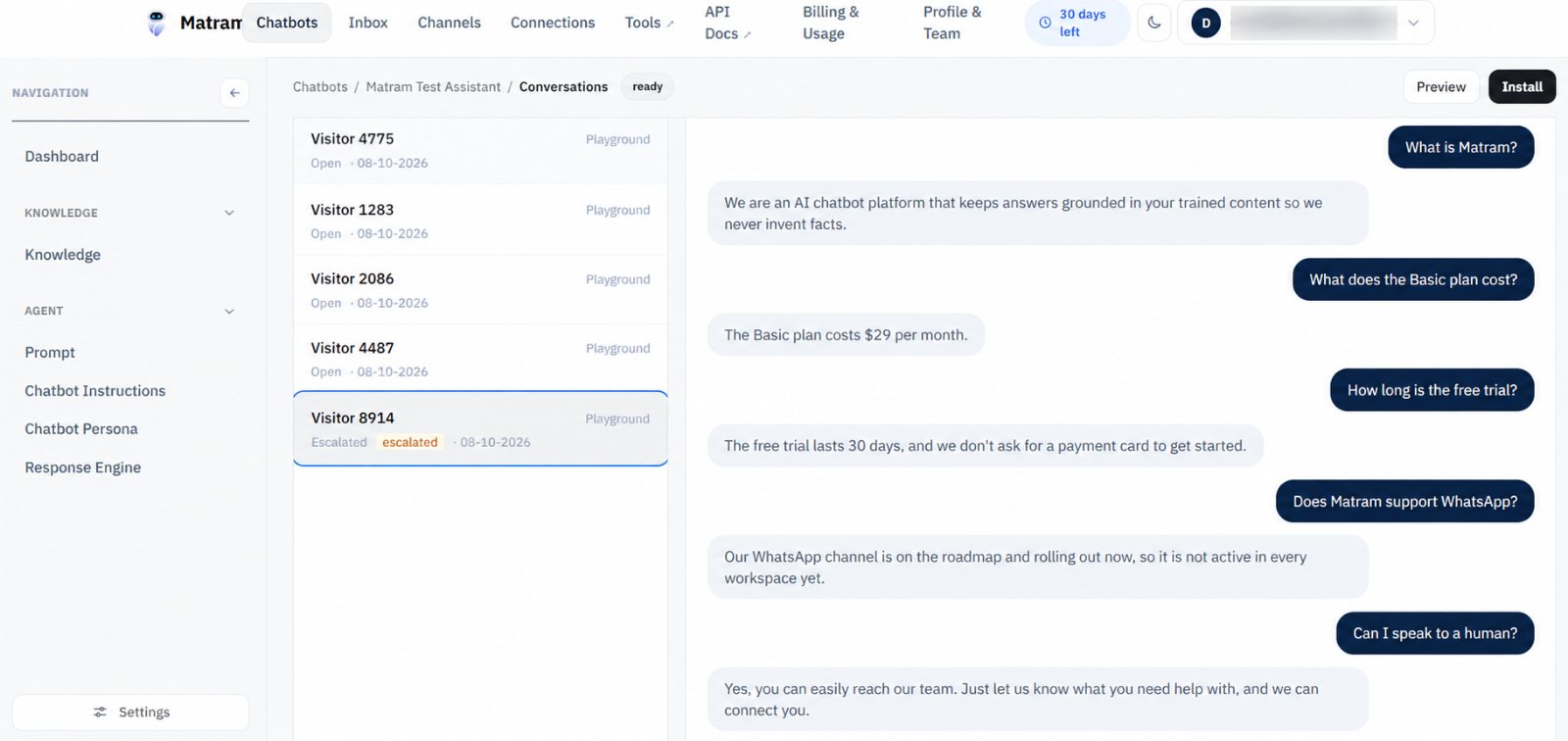
Caption: A Matram test conversation marked as escalated for human review.
If you connect additional channels through Matram’s integrations, include those conversations in the same weekly review. A question asked in a website widget may appear again in another channel with different wording.
Turn Matram findings into content tickets
After reviewing a conversation, record the finding in a simple table.
| Field | Example |
|---|---|
| Exact question | “Can I cancel before the next billing date?” |
| Visitor intent | Understand cancellation timing |
| Failure type | Missing policy detail |
| Evidence | Asked three times, one escalation |
| Content patch | Add cancellation timing to the billing FAQ |
| Owner | Support or content team |
| Re-test date | Next weekly review |
Do not write “Matram failed” and move on.
Write what was missing, where the answer should live, and how you will confirm the fix.
The output of chatbot transcript analysis should be a small queue of content improvements, not a spreadsheet nobody checks again.
How to prioritise Matram content gaps
When you find several gaps, prioritise them using four questions:
- How often does the question appear?
- Could a wrong answer create financial, legal, or trust problems?
- Does it lead to an escalation or lost enquiry?
- Can your team fix it quickly and verify the result?
A repeated pricing question usually deserves attention before a one-off request for an unusual integration.
A sensitive account question may deserve attention even if it appears only once.
Frequency helps you rank the work. Risk helps you decide what cannot wait.
Common chatbot transcript analysis mistakes
Reviewing only successful Matram conversations
Successful answers are useful, but they rarely show your biggest content gaps.
Treating answer coverage as accuracy
Matram can answer every question in a test sample while still answering some of them poorly. Read the transcript and check the source.
Fixing the wording but not the source
If the source is outdated, rewriting the chatbot instruction only hides the problem temporarily.
Counting the same benefit twice
Do not count an avoided escalation as both a resolved conversation and a saved support cost unless your measurement rules clearly separate them.
Publishing an unverified chatbot answer
A test conversation shows what Matram said. It does not prove that the statement is true.
Matram FAQ: chatbot transcript analysis
What is chatbot transcript analysis?
Chatbot transcript analysis is the process of reviewing conversations to find repeated questions, missing information, incorrect answers, unclear wording, and handoff patterns. In Matram, this helps your team improve the content used to answer visitors.
How does Matram help identify unanswered questions?
Matram’s dashboard shows top questions, conversations, answer coverage, and escalations. Your team can then open the transcript, identify the gap, update the source content, and ask the question again.
What should I do when Matram gives an unsupported answer?
Check whether the answer appears in an approved source. If it does not, add the correct information or configure Matram to say that it does not know and offer a human handoff.
Can Matram replace human transcript review?
No. Matram helps your team find patterns faster, but a person still needs to decide whether the content change is accurate, safe, and appropriate.
How often should I review Matram conversations?
A weekly review is a practical starting point. Set aside 30 minutes, review a focused sample, make one improvement, and test it again.
Conclusion
The best Matram improvement loop is simple:
Review the question.
Find the gap.
Patch the source.
Ask again.
Start with 20 Matram conversations this week. Choose one repeated question, one escalation, and one answer that needs a source check. Fix one of them and retest it.
That is how chatbot transcript analysis turns Matram’s chat history into better customer support.
You can explore Matram’s plans if you want to test the workflow with your own content.
See Matram in action
Watch it answer from real content, with the exact source page cited, on the live demo.
Book a demo