Best AI Agent for Customer Service: An Honest Comparison

TL;DR
matram.ai is the practical fit when customer service mainly needs cited answers and controlled follow-up actions.
It works as an AI customer service agent through a grounded chatbot, following predefined paths instead of planning unscripted steps at runtime.
For autonomous multi-step work, Sierra has the clearest documented runtime planning in this comparison.
Fin is easier to price publicly at $0.99 per outcome, plus a helpdesk seat if you use Intercom.
Agentforce and Zendesk AI Agents make the most sense when your support operation already lives in their respective platforms.
Decagon offers strong multichannel automation, but its natural-language procedures place more control with the team designing the workflow.
Introduction
A customer asks to change a delivery address. The hard part is checking the order, updating the right record and responding when the first system fails.
A chatbot can explain the policy. An agent should choose approved tools, act inside connected systems and respond to each result.
This comparison separates the customer service role from the technology behind it. A product can work as a customer service agent without independently planning every step. The review is based on public documentation and pricing checked on 14 September 2026, not a private hands-on benchmark.
This guide comes from the team behind matram.ai, so we want to be clear about where it fits. matram.ai handles customer questions and useful follow-up actions through a grounded, predefined approach. That can be a better fit than autonomous planning when the work is predictable.
What makes a customer service tool a real AI agent?
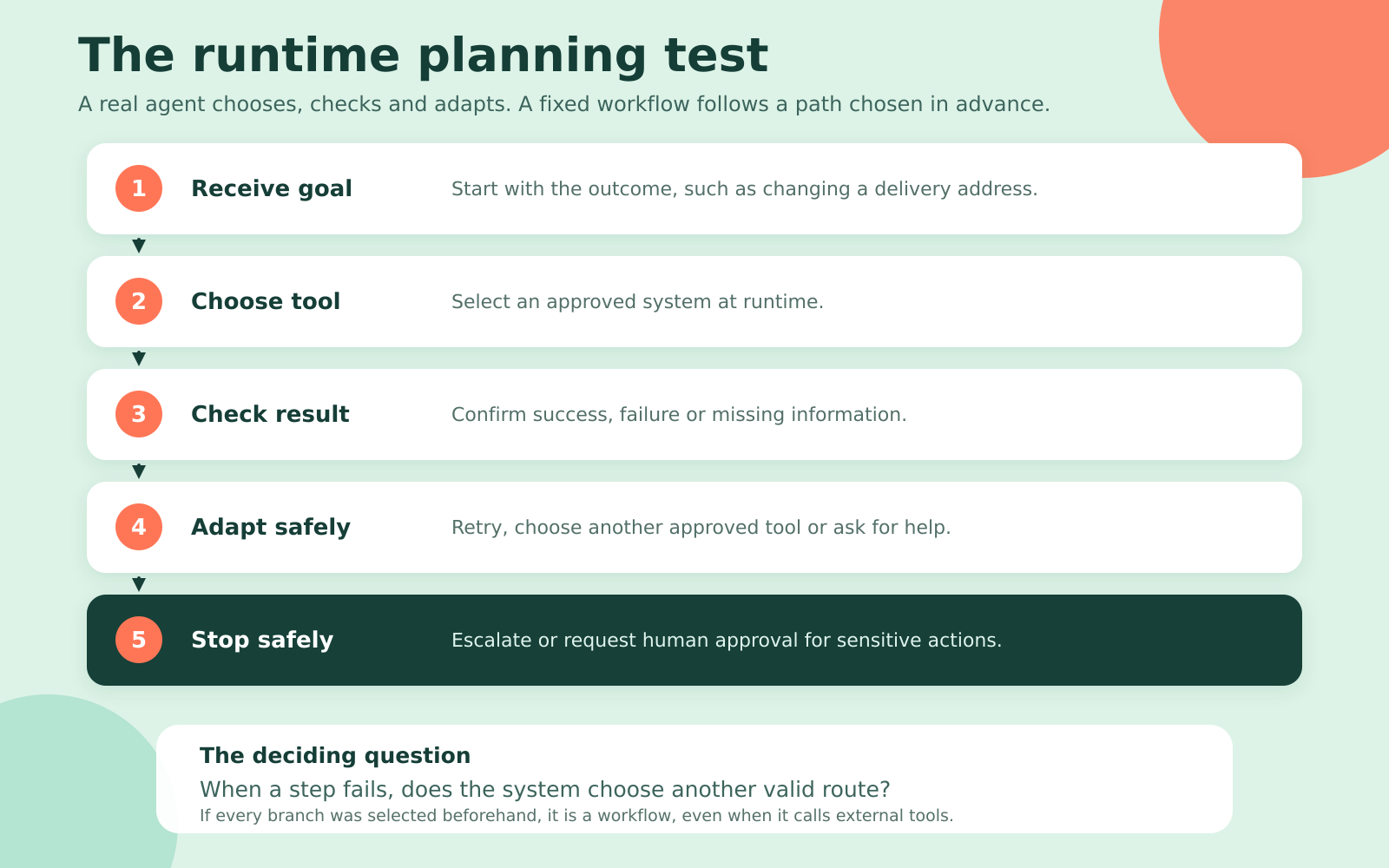
A real customer service AI agent controls how it reaches a goal. It selects tools, observes the result and chooses the next step at runtime. A workflow can also call external systems, but its sequence is defined in advance.
Anthropic's engineering guide draws the same distinction. Workflows follow predefined code paths, while agents dynamically direct their own processes and tool use.
Use these five checks when reading any product page:
| Test | What a real agent should do |
|---|---|
| Planning | Choose a sequence based on the customer's goal and current context |
| Tool choice | Select the appropriate approved tool at runtime |
| Action | Read from or write to an external system with the right permission |
| Recovery | Notice a failed step and adapt instead of continuing blindly |
| Oversight | Record what it decided, called and changed, with approval gates where needed |
Tool use alone is not enough. A chatbot can retrieve a policy or open a ticket on a fixed path. The stronger test is whether the product can inspect a failed step and choose another valid route.
The best AI agents and grounded customer service tools at a glance
These products all support customer service, but they do not work in the same way. matram.ai leads as the grounded option. The other products provide different levels of documented runtime planning.
Prices are published US dollar rates checked on 14 September 2026. “No public rate” means the vendor requires a sales conversation.
| Product | Type | How it works | Published pricing | Best fit |
|---|---|---|---|---|
| matram.ai | AI customer service agent powered by a grounded chatbot | Answers from approved content and follows predefined paths for lead capture, booking, routing and human handoff | From $29 monthly, with unlimited team seats and a 30-day trial | Teams needing reliable customer answers and controlled follow-up actions without autonomous planning |
| Sierra | Autonomous AI agent | Uses long-horizon planning, runtime decisions, tool calls and action traces | Outcome-based, no public rate | Enterprises with complex journeys across several systems |
| Fin | AI agent | Uses multi-step reasoning, procedures and actions through APIs or MCP | $0.99 per outcome. Intercom starts at $29 per seat monthly on annual billing | Teams wanting public outcome pricing and flexible helpdesk support |
| Salesforce Agentforce | AI agent | Independently triggers configured actions and complex workflows | $2 per conversation or $500 per 100,000 Flex Credits | Service teams already using Salesforce |
| Zendesk AI Agents | AI agent | Generates procedures dynamically, reasons across requests and adapts in real time | Included with Suite and Support plans, then priced by resolution tier. Fixed outcome rates are not public | Teams already running support in Zendesk |
| Decagon | Controlled workflow platform | Executes complex workflows defined through natural-language procedures | No public rate | Enterprises wanting controlled automation across chat, email and voice |
matram.ai is best for grounded customer service
matram.ai works as an AI customer service agent by answering from a business's approved website, help center and documents. Every answer can cite its source, which helps visitors check the information instead of trusting an unsupported reply.
It can also capture leads, route them to connected systems, book meetings and hand a conversation to a person. These actions follow paths set by the business in advance. That makes matram.ai a practical fit when most customer requests end in an answer or a controlled follow-up action.
Plans start at $29 per month, with unlimited team seats and a 30-day trial without a credit card. The flat monthly model avoids separate per-seat and per-resolution charges.
Main limitation: matram.ai does not independently create an unscripted multi-step plan at runtime. Teams needing autonomous refunds, account changes or complex work across several systems should compare the agent platforms below.
Sierra is best for complex enterprise customer journeys
Sierra has the clearest public evidence of runtime planning in this shortlist. Its platform describes long-horizon planning, context carried across systems and decisions made within business guardrails.
Its Agent SDK lets a team define a goal while the system directs resources across a multi-step workflow. Agents can update a subscription or submit a warranty claim, while the observability layer exposes tool calls for review.
That suits requests crossing billing, account and support systems. It also makes clear permissions, action limits and failure reviews essential.
Main limitation: Sierra publishes an outcome-based pricing model but no standard rate. A buyer cannot estimate the software cost from the public site alone, and a serious deployment will require sales, integration and governance work.
Fin is best for clear outcome-based pricing
Fin is the easiest agent here to price before speaking with sales. Its official pricing is $0.99 per outcome, with a 50-outcome monthly minimum for standalone use. The Intercom pricing page, checked on 14 September 2026, lists its Essential helpdesk at $29 per seat per month on annual billing.
Fin's pricing page, checked on 14 September 2026, lists a 14-day trial without a credit card. Its product documentation says Fin can reason through multi-step procedures, write to third-party systems and take actions through APIs or MCP.
Two thousand successful outcomes cost $1,980 before Intercom seat charges. The usage line increases as the agent resolves more conversations.
Main limitation: Fin can run as a standalone agent, but the full Intercom setup has two meters: human seats and successful outcomes. This is fair when you want to pay for completed work, but it can become expensive at high resolution volume.
Salesforce Agentforce is best for Salesforce teams
Agentforce fits when customer records, cases and approved actions already live in Salesforce. It can trigger workflows such as appointment scheduling and order management, then pass context to a human when needed.
Agentforce pricing lists $2 per conversation, or $500 per 100,000 Flex Credits. A standard action uses 20 Flex Credits, so action count can matter more than chat count under the credit model.
A request needing authentication, an order lookup and a record update uses several actions. Model a real workflow instead of dividing credits by conversations.
Main limitation: Agentforce is easiest to justify inside Salesforce. Licenses, credits, Data 360 use and implementation can make total cost harder to predict.
Zendesk AI Agents are best for Zendesk support teams
Zendesk AI Agents fit teams whose tickets, history and handoffs already run through Zendesk. The product describes dynamic procedures, policy-aware reasoning and actions across connected systems.
Zendesk sells two AI products. Copilot assists human agents at $50 per agent monthly on annual billing. Zendesk AI Agents face customers and use outcome-based pricing. The AI Agents page says service plans include an allowance, after which resolutions are priced by outcome tier. Fixed tier rates are not public.
Main limitation: The outcome model is clear, but the public rate is not. Buyers need a Zendesk quote that names the included allowance, each resolution tier and how an escalation affects billing.
Decagon is best for controlled multichannel workflows
Decagon suits teams wanting one automation layer across chat, email and voice. Its Agent Operating Procedures let teams define workflows in natural language, then test and improve the logic.
That control is valuable where policies and permissions matter. Decagon connects with CRMs, helpdesks, call centers and knowledge bases.
Under the strict autonomy test, Decagon needs a qualification. Its public site emphasizes defined procedures and does not document open-ended planning as clearly as Sierra. A demo should test who chooses the next step when the expected path breaks.
Main limitation: Decagon publishes no standard pricing. Ask its team to show failure recovery, not only a successful journey.
How much does a customer service AI agent cost?
There is no useful monthly average because AI agents use different billing units. Published rates range from less than a dollar per outcome to seven-figure annual agreements.
| Pricing model | Current example | What changes the bill |
|---|---|---|
| Per outcome | Fin at $0.99 per outcome | Successful resolutions or other billable outcomes |
| Per conversation | Agentforce at $2 per conversation | Customer conversations handled |
| Per action | Agentforce at 20 Flex Credits per standard action, with 100,000 credits priced at $500 | Steps executed inside each request |
| Resolution tiers | Zendesk AI Agents, with no fixed tier rate published | Type and value of the completed resolution |
| Quote-based outcomes | Sierra | Contract terms and completed work |
| Annual enterprise license | NiCE Cognigy at $43,080 for 60,000 annual conversations | Contracted capacity, setup and deployment scope |
The Cognigy figure is a price anchor, not a recommendation. Its current AWS Marketplace listing describes that package as a 12-month Basic plan with platform setup and standard support.
Compare a complete workload: conversations, actions, seats, integrations and implementation. Then ask what happens to the bill when the agent performs better.
Related reading: Use the Chatbot ROI Calculator to test support costs against your own conversation volume.
How to test an AI agent before buying
A useful agent demo includes a broken step. A polished answer does not prove planning, recovery or safe action.
Use one real request from your queue, such as changing a delivery address before dispatch:
- Give the system the outcome, not a scripted sequence.
- Require it to authenticate the customer and check the shipping state.
- Make the first order-system call fail or return incomplete data.
- Watch whether it retries safely, chooses another approved tool, asks for help or stops.
- Test a case that requires human approval before the record changes.
- Inspect the action log and confirm who approved what.
- Check that the customer receives an accurate final status instead of a confident guess.
Ask the vendor to repeat the test with an unprepared exception. If every branch was configured beforehand, you may be looking at a strong workflow. That can still be the safer purchase.
How should you choose the right customer service AI?
Choose the architecture from the work, then the vendor from your systems and billing model.
Use this decision check:
- Work ends in an answer, lead, booking, route or handoff: Start with matram.ai or another grounded customer service tool.
- Work ends in a changed record: Consider an AI agent with limited permissions.
- Support already runs in Salesforce: Test Agentforce first.
- Support already runs in Zendesk: Compare Zendesk AI Agents with a standalone agent before adding another platform.
- You need public outcome pricing: Put Fin on the shortlist.
- Requests cross several systems over many steps: Test Sierra's planning and governance controls.
- You want visible procedures across chat, email and voice: Test Decagon, with special attention to failure recovery.
Before signing, confirm what creates a charge, which actions are allowed, where approval is required and how failures are logged.
Frequently asked questions
What is the best AI agent for customer service?
For cited answers and controlled customer service actions, matram.ai is the simpler fit. For autonomous work across several systems, Sierra has the strongest public evidence of runtime planning. Fin offers clearer outcome pricing, while Agentforce and Zendesk AI Agents fit teams already using those platforms.
How is an AI agent different from a chatbot?
A chatbot answers within a conversation and may call tools along paths defined in advance. An AI agent chooses its own sequence of approved tools at runtime, checks the result and adapts until it completes the goal or stops safely.
Can an AI agent issue refunds or update customer accounts?
Yes, if it has an approved integration, the right permissions and a policy allowing the action. Sensitive changes need limits, approval gates and an audit trail.
How much does a customer service AI agent cost?
Public pricing includes Fin at $0.99 per outcome and Salesforce Agentforce at $2 per conversation or $500 per 100,000 Flex Credits. Sierra and Decagon do not publish standard rates. Zendesk publishes the billing structure for AI Agents but not a fixed price for every resolution tier.
Does a small business need an autonomous AI agent?
Not usually. A grounded customer service tool such as matram.ai is easier when existing content answers most requests. An autonomous agent becomes useful when repeated requests require several system actions, runtime decisions and carefully controlled permissions.
How does matram.ai work as a customer service agent?
matram.ai works as a customer service agent by answering from approved content, citing its sources and following predefined paths for lead capture, routing, booking and human handoff. Its grounded approach focuses on reliable answers and controlled actions rather than unscripted multi-step planning.
Choose the work before the label
Choose the product that completes the job without unnecessary freedom, cost or risk. Test a failed step, inspect the action log and model a successful month's bill.
If your customer requests end in documented answers rather than account changes, start smaller. Try matram.ai free for 30 days with your existing content. No card required.
Trained only on your content · Shows the source of every answer · Your content is never used to train third-party AI models · Answers in 95+ languages
See Matram in action
Watch it answer from real content, with the exact source page cited, on the live demo.
Book a demo