Freshdesk Alternative: When to Keep, Layer or Switch


TL;DR
Keep Freshdesk if tickets, ownership, routing, SLAs and an auditable support history are central to your work.
Layer Matram in front of Freshdesk if many tickets begin as repeat questions already answered in your help content.
Switch only if your team mainly needs cited answers, lead capture and human handoff rather than full ticket operations.
Compare Freshdesk agent fees with Matram message limits carefully. They measure different things.
Confirm the Freshdesk connector before planning around it. Matram describes the import in one place and labels it “Soon” in another.
Freshdesk pricing per agent: what the official plans actually charge
Freshdesk’s current pricing lists Growth at $19, Pro at $55 and Enterprise at $89 per agent each month when billed annually. The number shown on the page is a monthly equivalent, but the annual commitment matters when you work out the real budget.
Growth includes ticketing, a shared inbox, a customer portal, a knowledge base and standard reporting. Pro adds deeper support operations such as intelligent routing, multiple SLA policies and custom reporting. Enterprise adds controls including routing based on agent skills, audit logs, a sandbox, allowed domains and IP whitelisting. These base prices do not include Copilot or extra AI Agent session packs. Work out the seat bill first, then add only the AI capacity your team expects to use.
This is why price alone cannot decide the fit. A small team that needs assignment and accountability may get more value from Freshdesk than a larger team that mainly repeats information already published on its website.
AI introduces a second meter
Freshdesk lists the first 500 Freddy AI Agent sessions as included. Additional sessions cost $49 per 100. Freddy AI Copilot is listed at $29 per agent each month, billed annually, on Pro and Enterprise.
These are separate charges for different jobs. An AI Agent session measures automated customer interactions. Copilot assists human agents. Neither should be quietly added to the base subscription unless your team will actually use it. The Freshdesk plan and subscription guide is also worth checking before purchase because active seats and product choices affect the subscription.
Sometimes the ticket system is exactly right
Per agent pricing does not automatically make Freshdesk the wrong choice. If a request must be assigned, prioritised, escalated, tracked against an SLA and preserved as part of a customer history, a proper ticket system earns its place. The question is whether every repeat question deserves that machinery.
Freshdesk vs Matram: two different support models
Freshdesk manages support work after a request reaches the team. Matram is designed to answer documented questions before they become support work. It trains on approved content, gives a source with each answer, captures leads and hands a conversation to a person when needed.
That makes Matram useful as a layer. It does not do every job Freshdesk does.
| Criterion | Matram | Freshdesk |
|---|---|---|
| Core job | Answers documented questions before a ticket, with lead capture and handoff | Ticketing, shared inbox and support operations |
| Pricing meter | Monthly plan selected by message allowance | Active agent seats |
| Team seats | Unlimited team seats on published plans | Cost changes with active agent count |
| AI usage | Message allowance by plan | AI Agent sessions; Copilot has a separate price for each agent |
| Ticket record | Not presented as a full helpdesk ticket record | Assignment and ticket tracking are documented |
| Routing and SLAs | Comparable routing and SLA workflows are not documented | Available, with plan differences |
| Knowledge sources | Website, sitemap, PDF, DOCX and text, with several source connectors | Knowledge base and customer portal |
| Answer citations | Matram says every answer links to its source | Not stated on the pricing page reviewed |
| Human role | A conversation can be handed to a person with its transcript | Agents work and collaborate inside the inbox |
| Best fit | Teams with repeat questions that can be answered from maintained content | Teams that need ticket ownership, routing, SLAs and support history |
Sources: Freshdesk pricing, Matram pricing and Matram integrations. Product details checked on 19 August 2026.
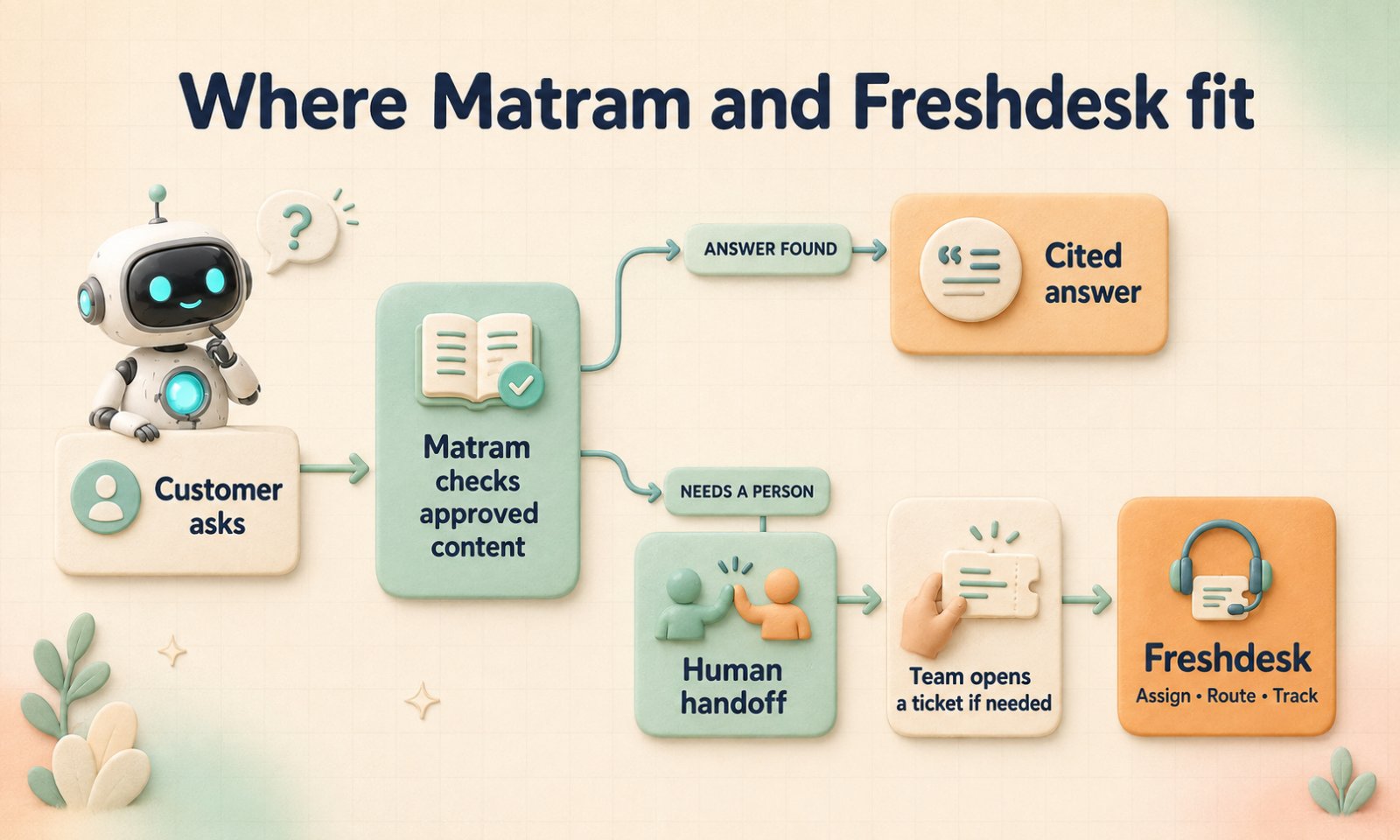
One way to layer the tools: Matram answers from approved content, while the team opens a Freshdesk ticket when a case needs tracking. This does not imply native synchronisation.
What the cost looks like at 3, 5 and 10 agents
The table below uses the annual billing rates published by Freshdesk. Annual total equals agent count multiplied by the monthly rate and then by 12.
| Plan | Published rate | 3 agents | 5 agents | 10 agents |
|---|---|---|---|---|
| Growth | $19 per agent per month | $57/month or $684/year | $95/month or $1,140/year | $190/month or $2,280/year |
| Pro | $55 per agent per month | $165/month or $1,980/year | $275/month or $3,300/year | $550/month or $6,600/year |
| Enterprise | $89 per agent per month | $267/month or $3,204/year | $445/month or $5,340/year | $890/month or$10,680/year |
Matram’s published plans use a different meter. Basic is $29 a month for 2,000 messages, Standard is $69 for 5,000 messages, and Pro is $199 for 20,000 messages. Each published plan includes unlimited team seats. Prices are in USD and exclude applicable tax. The free trial lasts seven days, then paid plans begin.
A Freshdesk ticket, a Freddy AI session and a Matram message are not equivalent units. Subtracting one plan price from another and calling the difference savings would be misleading without real ticket volume, message volume and workflow requirements.
Want to test your own assumptions? Model the cost with your support volume instead of relying on a generic savings claim.
Which alternative to Freshdesk fits the job?
Do not rank these from one to five. Start with the work your team needs to protect or remove.
| Option | Best fit | Full ticketing | Pricing meter | Main limitation | Typical setup scope |
|---|---|---|---|---|---|
| Matram | Repeat questions answered from maintained content | Designed for answering before a ticket, not full ticketing | Monthly message allowance with unlimited seats | Full ticket operations still need a helpdesk | Add sources, test citations, define handoff and retain Freshdesk during the pilot |
| Zoho Desk | A full helpdesk for teams using Zoho | Yes | Per user, with plan and regional differences | Features and prices vary by edition and location | Configure channels, departments, routing and SLAs; migrate history if needed |
| Zendesk | Mature ticketing and multichannel routing | Yes | Per agent, plus usage charges and optional extras | Broader than a narrow answer layer | Configure channels, automation and integrations; plan required history migration |
| Help Scout | Shared inbox support with lighter workflows | Yes | Per user, with AI Answers per resolution | Advanced features depend on tier | Set up inboxes, Docs and workflows; plan required imports |
| Crisp | Multichannel messaging with workspace pricing | Ticketing is listed on Plus | Per workspace, with included seats and AI credits | Allowances vary by plan | Set up channels and choose Plus if a ticket portal is required |
Pricing and feature sources: Zoho Desk, Zendesk, Help Scout and Crisp. Setup scope is editorial guidance, not a vendor promise.
Freshdesk vs Zoho Desk
Both products are full helpdesks. The choice comes down to the software your team uses, the plan features you need and the cost in your region. Zoho Desk may fit neatly into an existing Zoho setup. Freshdesk may suit a team already built around Freshworks. Check the required routing, SLA, reporting and security features in the exact plan before choosing.
When Matram can be a Freshchat alternative for documented questions
Matram can cover a narrower job inside support: answering product, policy and setup questions from approved content, with a source attached. It does not reproduce Freshchat’s omnichannel inbox, human messaging workspace or the broader ticketing available through Freshdesk Omni. If agents need to manage live conversations across channels, Freshchat’s documented scope remains important.
How to test Matram without replacing Freshdesk
Do not begin by migrating ticket history or removing agent access. Begin with one small group of questions customers ask repeatedly.
- Choose a public help centre section, website directory or small set of approved files.
- Add the content through a website URL, XML sitemap, PDF, DOCX file or pasted text.
- Ask real questions from recent tickets. Include vague wording, follow up questions and cases where the answer is not in the source.
- Check whether each answer is correct and whether the cited page genuinely supports it.
- Define the point where Matram must stop and hand the conversation to a person.
- Deploy it on one controlled surface first, then review unanswered questions before expanding.
Keep Freshdesk running during the test. It protects the existing workflow while you learn which questions can be answered before a ticket and which still need an agent. Also confirm the current Matram integrations before assuming that Freshdesk help centre content can be imported through a native connector. The page currently describes Freshdesk importing in one section and marks it “Soon” in another.
If the content is ready, you can try Matram for seven days without changing the helpdesk underneath it.
When a full helpdesk is the better fit
Keep Freshdesk or compare another full helpdesk when support depends on durable ticket records, several queues, ownership rules, advanced routing, SLA policies or a detailed audit trail. The same applies when agents work from private ticket history that cannot simply become public answer content.
A full helpdesk is also easier to justify when managers must see who owned each case, which response target applied and how an issue moved between teams. That record matters for complaints, complex accounts and internal reviews. An answer layer can reduce incoming work, but it should not erase the operational record behind it.
Procurement may decide the question too. Matram states that it does not currently hold SOC 2, ISO 27001, HIPAA, PCI DSS or FedRAMP attestations. It also does not offer deployment on your own infrastructure, a private cloud or a contractual uptime SLA. If any of those are mandatory, read Matram’s current security limitations before spending time on a pilot.
Frequently asked questions
Is Matram a full Freshdesk replacement?
No. Matram can answer documented questions, show the source, capture a lead and hand a conversation to a person. It is not presented as a complete replacement for Freshdesk ticket queues, assignment, SLA management, routing, agent collaboration or historical ticket operations.
Can Matram use content from a Freshdesk help centre?
Matram can use a public website URL, XML sitemap and supported files such as PDF and DOCX. Its integrations page also describes Freshdesk importing, but another part marks Freshdesk as “Soon.” Confirm the connector directly before making it part of an implementation plan.
What is the best alternative to Freshdesk for a small support team?
It depends on what the team needs. Matram fits repeat questions backed by maintained content. Zoho Desk, Zendesk, Help Scout or Crisp may fit teams that still need ticketing, shared inboxes or multichannel messaging. Compare workflow, usage, team size and budget together.
Is Matram a Freshchat alternative?
It can be an alternative for documented questions that need a cited answer before an agent steps in. It is not a replacement for Freshchat’s omnichannel messaging, unified agent workspace or live conversation management. Choose based on whether the main job is answering or managing conversations.
Freshdesk vs Zoho Desk vs Matram: which should a team choose?
Choose Freshdesk or Zoho Desk when the team needs a full helpdesk with tickets, ownership, routing and SLAs. Choose Matram when the main problem is repeat questions that should be answered from existing content. Use Matram with a helpdesk when both jobs matter.
Can I use Matram and Freshdesk together?
Yes. Matram can answer questions on the website while Freshdesk remains the system used for tickets and agent work. This does not require the two products to be treated as direct substitutes, and it does not prove that native synchronisation is currently available.
The bottom line
If repeat questions are filling the queue, reduce the number that become tickets before replacing the system that manages them. Keep Freshdesk for real ticket operations, layer Matram where approved content can answer first, and switch only when the helpdesk workflow itself is no longer needed.
Try Matram free for seven days or book a demo to test the fit with your own support content.
Still comparing support models? See all Matram alternatives.
See Matram in action
Watch it answer from real content, with the exact source page cited, on the live demo.
Book a demo