Zoho Desk Alternative: Keep Zoho, Add the Answer Layer You Need


TL;DR
Zoho Desk is a full helpdesk. Matram is an answer layer trained on approved content.
Keep Zoho Desk if its ticket workflow still serves the team.
Add Matram when documented questions continue to fill the queue.
Matram can run separately on the website or inside Zoho SalesIQ.
Zoho documents a SalesIQ-to-Desk integration, but Matram’s exact end-to-end handoff through that connection is not publicly confirmed.
Zoho Desk uses per-user pricing. Matram uses message allowances with unlimited team seats.
Compare another helpdesk only when the helpdesk workflow itself needs to change.
How Zoho Desk pricing shapes the replacement decision
Zoho Desk pricing is based mainly on the number of support users and the selected plan. Higher plans add different channels, automation and operational features.
A rising seat cost may prompt a comparison, but price alone does not show which system should be replaced. If the team depends on ticket records, assignments and SLAs, those functions still require a helpdesk.
The right plan depends on the workflow
Zoho localises its pricing and some AI features depend on the account’s data centre. Confirm the current plan details shown for the intended account before buying.
The consistently documented operational differences include:
- Free provides basic email ticketing for up to three users.
- Express includes email support, social media, web forms, direct assignment, workflows and multi-level escalations.
- Standard adds business messaging, instant messaging, a knowledge base, the ASAP self-service widget and custom reports.
- Professional adds telephony, blueprints, multiple departments, round-robin assignment, a multilingual help centre and webhooks.
- Enterprise adds Zoho SalesIQ live chat, guided conversations, skill-based assignment, multi-level IVR, a multi-brand help centre, custom modules and a sandbox.
The exact feature availability should be checked on Zoho’s current plan comparison, particularly for AI features and data-centre-specific services.
Per-user pricing changes with the support team
With per-user pricing, the bill changes as paid support seats are added. This matters for a growing team, especially if several people require full access to the helpdesk.
Matram uses a different billing unit. Its published plans are based on monthly message allowances and include unlimited team seats. Adding teammates does not change the base price, but higher conversation volume can require a larger message plan.
Neither meter is automatically cheaper. The result depends on team size, message volume and the work each product must perform.
Replacing the whole stack may solve the wrong problem
If Zoho Desk is correctly assigning tickets, tracking SLAs and preserving customer history, replacing it only to answer repeat questions creates a larger migration than necessary.
In that situation, keep the working ticket system. Test whether an answer layer can prevent documented questions from reaching it.
Zoho Desk vs Matram: ticket operations or content answers
Zoho Desk and Matram overlap around customer support, but they are built for different jobs.
| Criterion | Zoho Desk | Matram |
|---|---|---|
| Core job | Manage support tickets and service workflows | Answer questions from approved content before human attention is needed |
| Billing unit | Paid users, with plans and prices varying by market | Monthly message allowance with unlimited team seats |
| Ticket history | Maintains ticket and customer support history | Not a full historical ticket system |
| Assignments and SLAs | Available, with limits varying by plan | Does not provide helpdesk ticket queues, ticket routing or SLA management |
| Knowledge sources | Zoho Desk knowledge base and supported integrations | Websites, sitemaps, PDF, DOCX, text and listed connectors |
| Answer citations | Not stated as a universal capability on the reviewed pricing pages | Every answer links to its source |
| Channels | Email, forms, social media, messaging and other channels depending on plan | Website widget and the channels listed on Matram’s integrations page |
| Zoho placement | Native part of the Zoho service ecosystem | Listed as a deployment option inside Zoho SalesIQ |
| Human involvement | Agents work inside the ticketing system | Hands a conversation to a person with its transcript |
| Security fit | Requirements must be checked against the selected Zoho plan and contract | No SOC 2, ISO 27001, HIPAA, PCI DSS or FedRAMP attestation; no private-cloud or on-premise deployment |
| Best fit | Teams that need controlled ticket operations | Teams receiving repeat questions answerable from approved content |
| Weakest fit | Teams that only need a lightweight answer layer | Teams that require a complete helpdesk or specific enterprise procurement controls |
Sources: Zoho Desk plans, Zoho Desk feature comparison, Matram integrations and Matram security.
Two coexistence paths and what is actually verified
There are two possible ways to use Matram while keeping Zoho Desk. They do not carry the same level of verification.
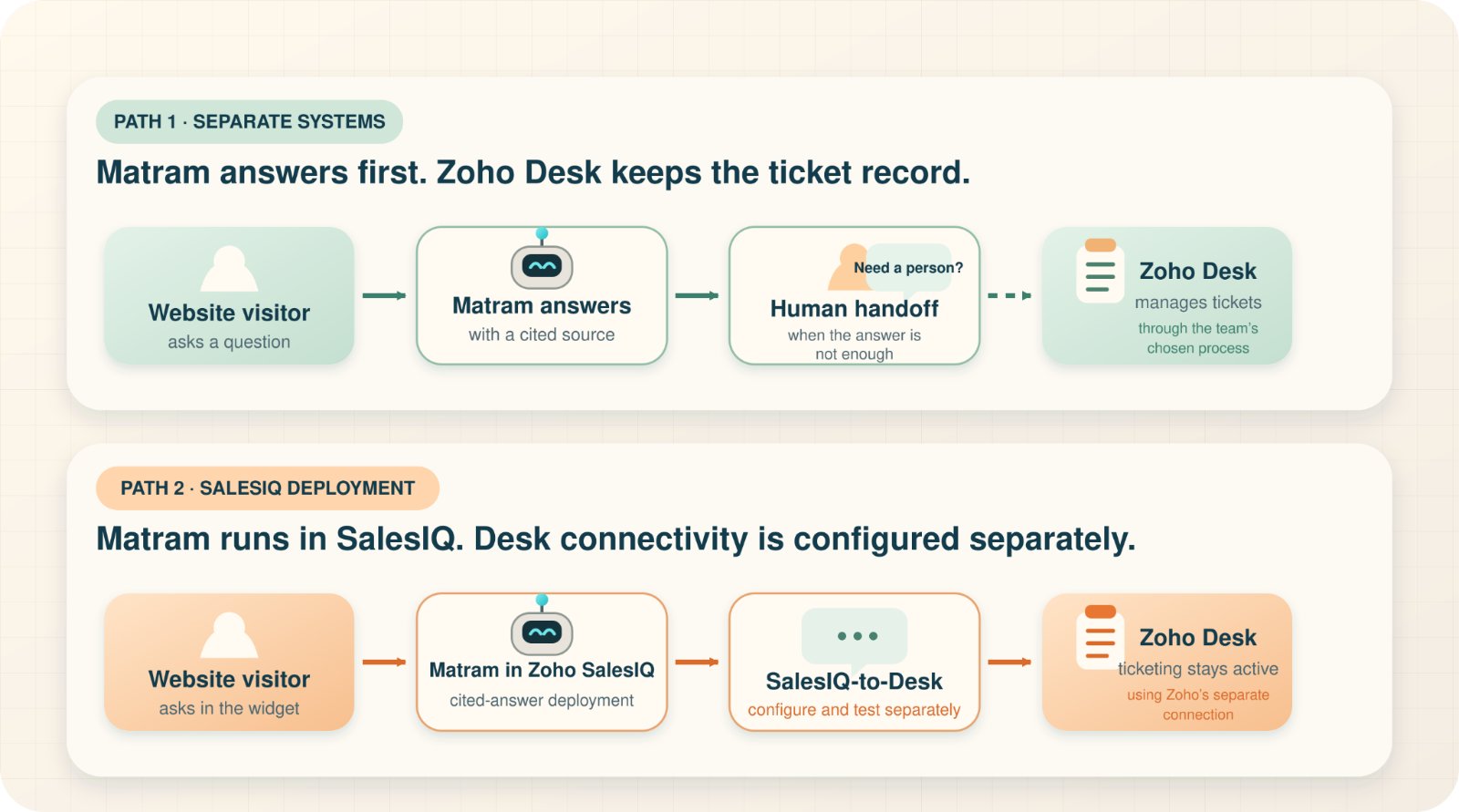
Path 1: Use Matram separately on the website
This is the clearest route.
A visitor asks a question through the Matram website widget. Matram checks the approved content and returns an answer with its source. If the content does not support an answer or the case needs a person, Matram follows the handoff rule set by the team.
Zoho Desk continues to manage tickets separately. No native connection between the two products is implied.
Path 2: Deploy Matram in Zoho SalesIQ
Matram lists Zoho SalesIQ as a live deployment channel. Zoho separately documents that SalesIQ can connect with Zoho Desk.
Zoho’s own integration can convert selected SalesIQ chats into Desk tickets, synchronise Zoho Desk knowledge-base articles and allow authorised SalesIQ operators to view Desk information.
What is not publicly confirmed is whether a Matram conversation or handoff inside SalesIQ automatically follows that complete path with the required transcript, fields and ticket settings.
Test this workflow inside the intended accounts before describing it to customers or removing an existing support step.
Published pricing by billing unit and currency
Zoho’s official page displayed India pricing in INR. Matram publishes its plans in USD.
| Product and plan | Published rate | Billing basis or allowance |
|---|---|---|
| Zoho Desk Free | Free | Up to 3 users |
| Zoho Desk Express | ₹420 per user per month | Billed annually |
| Zoho Desk Standard | ₹800 per user per month | Billed annually |
| Zoho Desk Professional | ₹1,400 per user per month | Billed annually |
| Zoho Desk Enterprise | ₹2,400 per user per month | Billed annually |
| Matram Basic | $29 per month | 2,000 messages and unlimited team seats |
| Matram Standard | $69 per month | 5,000 messages and unlimited team seats |
| Matram Pro | $199 per month | 20,000 messages and unlimited team seats |
| Matram Enterprise | No public price | Custom message volume and unlimited team seats |
Zoho states that applicable local taxes are additional. Matram states that its prices are in USD and exclude applicable tax.
Sources: Zoho Desk pricing and Matram pricing.
These figures should not be subtracted from one another and presented as savings. Zoho Desk charges for helpdesk users. Matram charges for answer-layer messages. They perform different jobs, use different billing units and are displayed in different currencies.
Which alternative to Zoho Desk fits the reason for switching?
Start with the problem the team is trying to fix. Do not rank tools from one to five without considering the required workflow
| Option | Best fit | Ticketing depth | Answer layer | Pricing meter | Main limitation |
|---|---|---|---|---|---|
| Matram | Cited answers from approved content | Not a full helpdesk | Core product function | Message allowance with unlimited seats | No confirmed native Zoho Desk connector |
| Freshdesk | Structured ticketing, shared inboxes and support operations | Full helpdesk | Freddy AI Agent available | Per agent, with separate AI session charges | Requires migration and setup if Zoho Desk is removed |
| Help Scout | Teams centred on a shared inbox and collaborative support | Shared inbox and conversation workflow | AI Answers and help content available | Plan and user limits | Confirm the required channels and workflows on the selected plan |
| Zendesk | Ticketing, routing and multichannel support operations | Full helpdesk | AI Agents available | Per agent, with automated-resolution charges and optional add-ons | Plan, usage and add-on requirements need careful mapping |
| Zoho Desk with SalesIQ | Teams staying inside the Zoho ecosystem | Zoho Desk remains the ticket system | SalesIQ provides the visitor chat layer | Desk per user; paid SalesIQ plans per operator | Does not solve dissatisfaction with Zoho Desk itself |
Sources: Freshdesk pricing, Help Scout shared inbox, Help Scout pricing, Zendesk pricing and Zoho SalesIQ pricing.
Zoho Desk vs Freshdesk: two full-helpdesk approaches
Zoho Desk and Freshdesk both manage tickets, agents, assignments and support operations. Choosing between them is a helpdesk decision, not an answer-layer decision.
Freshdesk’s current annual pricing page lists Growth at $19, Pro at $55 and Enterprise at $89 per agent per month. The first 500 Freddy AI Agent sessions are included once per account. Additional sessions are listed at $49 per 100 sessions.
Zoho localises its pricing and connects closely with the wider Zoho ecosystem. Compare the exact channels, SLA controls, routing rules, departments, reporting and integrations required by the team before choosing either product.
Do you need a Zoho SalesIQ alternative or a Zoho Desk alternative?
These searches point to different problems.
Look for a Zoho SalesIQ alternative when the issue is website chat, visitor engagement, live-chat staffing or bot behaviour.
Look for a Zoho Desk alternative when the issue is ticket ownership, assignments, SLAs, reporting, departments or the wider helpdesk workflow.
Matram can be deployed inside Zoho SalesIQ and can answer from approved content. That does not make it a full Zoho Desk replacement or prove a direct Desk integration.
A staged test without a risky migration
Do not begin by exporting ticket history or removing agent access. Test the answer layer first.
- Identify repeat questions that should be answerable from public content.
- Choose the website pages, sitemap, help articles, PDF or DOCX files Matram should use.
- Turn on strict mode so Matram offers a person instead of answering without an approved source.
- Install Matram on a small set of pages before expanding it across the site.
- Define which questions require a person and where the handoff should go.
- Review the conversation history and note which questions were answered, left unanswered or handed to a person.
- Keep Zoho Desk active while the test runs.
- If SalesIQ deployment is required, test ticket creation and transcript behaviour inside the real Zoho setup before publishing that workflow to customers.
Matram provides a seven-day trial without requiring a credit card. The purpose of the test should be to identify which questions can be answered safely, not to prove that an entire helpdesk can be removed in one week.
When another full helpdesk is the better answer
Keep Zoho Desk or compare another suitable support platform when the team requires:
- Owned ticket queues and historical records
- Assignment rules and department workflows
- SLA tracking and escalations
- Detailed audit trails
- Complex multichannel support operations
- Deep access to Zoho data
- Security attestations required by procurement
- Private-cloud, dedicated or on-premise deployment
Not every helpdesk provides every requirement on this list. Verify each one against the selected plan and contract.
Matram does not claim to provide these helpdesk and deployment capabilities. Its security page also states the certifications and hosting options it does not currently offer.
Frequently asked questions
1. Does Matram integrate directly with Zoho Desk?
Matram’s public integrations page lists Zoho SalesIQ as a deployment channel. It does not currently state that Matram has a native Zoho Desk connector, automatic ticket creation or direct transcript synchronisation.
2. Can Matram replace Zoho Desk?
Not as a complete helpdesk. Matram can answer documented questions from approved content, cite the source and involve a person when needed. It does not replace Zoho Desk’s ticket queues, assignments, SLAs, departments, reports or ticket history.
3. Can I keep Zoho Desk and use Matram?
Yes. The verified option is to run Matram as a separate website answer layer while Zoho Desk continues to handle tickets. Matram can also be deployed in Zoho SalesIQ, but the required SalesIQ-to-Desk workflow should be tested before it is treated as automatic.
4. Which is cheaper, Zoho Desk or Matram?
There is no universal answer because the products use different billing units. Zoho Desk charges per support user, while Matram’s plans are based on monthly message allowances with unlimited team seats. The published prices also use different currencies and tax rules.
5. What is the best alternative to Zoho Desk?
It depends on the reason for switching. Matram fits documented questions and cited answers. Freshdesk and Zendesk are full helpdesk options. Help Scout fits teams focused on a shared inbox. Staying with Zoho Desk and SalesIQ may make more sense when the Zoho ecosystem is still valuable.
6. Do I need a Zoho SalesIQ alternative or a Zoho Desk alternative?
Choose a SalesIQ alternative when the problem is live chat or website engagement. Choose a Desk alternative when the problem is ticketing, routing, SLAs, reporting or support operations. The two products work at different layers.
7. What content can train Matram?
Matram can use website URLs, XML sitemaps, PDF and DOCX files up to 10 MB, pasted text and the data-source connectors listed on its integrations page. A direct Zoho Desk knowledge-base connector should not be assumed unless Matram publishes or confirms one.
The bottom line
Keep Zoho Desk when it still handles ticket operations well. Add Matram when the missing piece is a fast, cited answer from content your team has already written. Replace the helpdesk only when its workflow is the part that no longer fits.
You can start Matram’s seven-day trial to test the answer layer with your own support content or book a demo to review the required setup.
Still comparing support models? See all Matram alternatives.
See Matram in action
Watch it answer from real content, with the exact source page cited, on the live demo.
Book a demo